From dispatch to done.Every step under control.
Travel, site work, materials, costs and timesheet, all in one place.
Designed for lift, plumbing and building maintenance teams.
Alex Morgan · Lift maintenance · Sample job
One job. The whole journey.
Travel, site work, materials, costs and timesheet, all in one place.
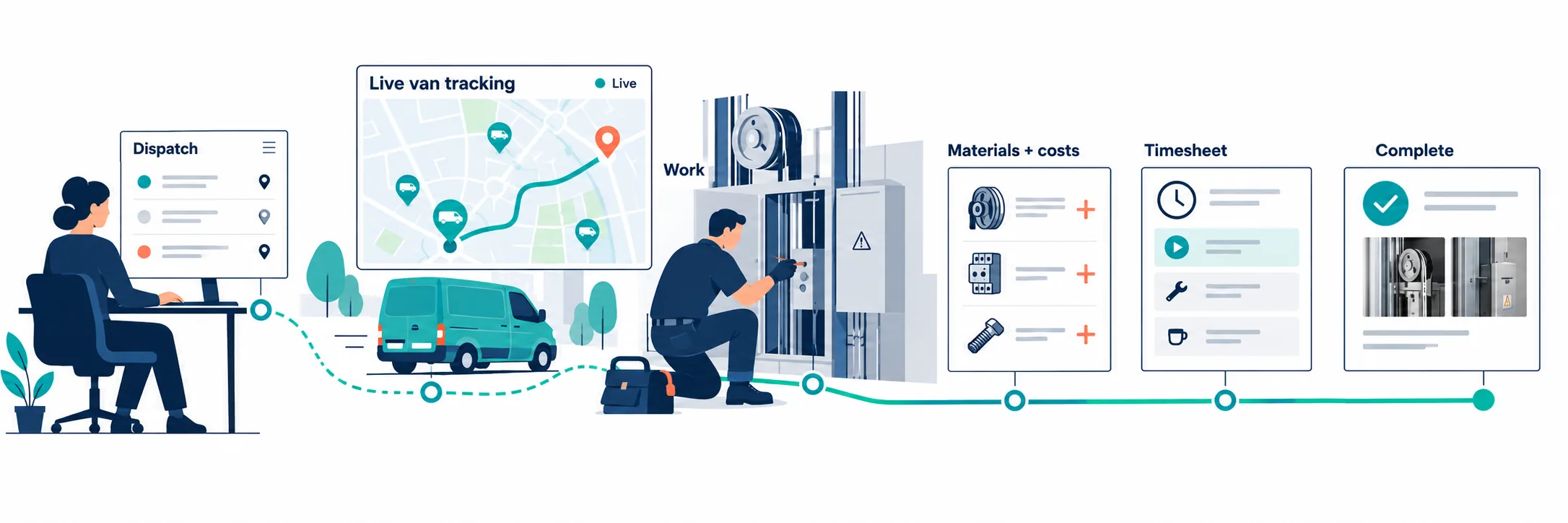
- Plan & dispatchAssign the engineer and site details.
- Live van trackingSee van locations and the journey to each job.
- ExecuteRecord site work and progress photos.
- Materials & extrasLog additional materials and costs.
- TimesheetsCapture travel and working time.
- CompleteKeep the final job record together.
From first call to final sign-off.
Plan the visit. Dispatch the engineer. Keep job documents, RAMS, photos and timesheets together. Give your office and field teams a shared view of the work.
The office and the field.Working as one.
Everything your team needs to move a job forward, with the details kept together at every step.
Give every job a clear start.
Move enquiries through quotes into jobs with one reference. Carry client documents forward and plan engineers across the week.
- Drag-and-drop scheduling by employee or by job
- Leave, training and double-booking conflict detection
- Live fleet view and navigation hand-off
Your vans in view.Your next move clearer.
See live van locations alongside engineers and job sites. Give the office a shared view of the fleet when planning visits or responding to a callout.
- Live fleet map updates without a page refresh
- Van pins and job locations in one view
- Connect your existing GPS tracker through its API
- Engineers can open their route in Google Maps or Waze
Keep the job moving on site.
Give engineers the job information they need on their phone, from arrival through the final visit.
- RAMS sign-off before work starts where required
- Materials and variations recorded on the phone
- Arrival, progress and completion photos
One job.One shared conversation.
Keep the office and the worker connected. Send job messages and notifications from the back office, receive replies from the field, and keep the whole conversation with the job.
- Workers receive job messages and notifications
- Two-way replies between the field and back office
- Take job photos on the phone and share them with the office in real time when connected
- Arrival, progress and completion photos stay with the job
See what’s happening on site, with the messages and photographic evidence together in one place.
Please check the lift door sensor and send a progress photo.
Sensor checked. I’ve attached the progress photos to this job.

Close the job with the details covered.
Bring time, materials and evidence together so the office can follow up without rebuilding the job record.
- Timesheets built from tap-in and tap-out
- Sage 50 and Xero CSV exports
- Configurable work statuses and retained audit history
- Timesheet
- Recorded
- Materials & variations
- Logged
- Completion photos
- Attached
- Office follow-up
- Ready for review
The whole working day.In your pocket.
The Jobs Tracker worker app for iOS and Android connects the engineer’s day to the office, from the first job to the weekly timesheet.

Less back-and-forth.More work moving forward.
See the work, get to site, record what happens and keep the office informed. Jobs, time, safety documents and team communication stay connected.
Features follow your company’s setup, permissions and scheduled work. Some controls are available only on the scheduled day or during the timesheet editing window.
Today’s jobs
Illustrative app preview
Westgate House
JT-2408 · Lift maintenance
Alex Morgan · Lead engineer
Riverside Centre
JT-2407 · Plumbing
Open job detailsEverything available to your workers.
Open a group to explore the details.
Your day and your next job5 features
- Today’s jobs
- See assigned work, site details, job references, priorities, status and the team on each job.
- Upcoming work
- Preview upcoming assignments and scheduled times. Job actions unlock on the scheduled day.
- Unplanned jobs
- Create a job from the field with a title, site address and notes; capture the site position when location is available.
- Travel and directions
- Start travel from the job, preview the route, distance and estimated duration, copy the address, then open Google Maps or Waze.
- Site notices
- Read site-specific information before getting started.
Work safely and record progress5 features
- RAMS and safety forms
- Read attached RAMS, answer required safety questions, add comments and sign off. Required unsigned RAMS prevent work starting.
- Job checklists
- Complete or reopen tasks, add notes and see progress and outstanding photo requirements.
- Job chat
- Message the office and teammates within the job, keeping the conversation connected to the work.
- Photos and captions
- Take a photo or choose one from the gallery, categorise it as arrival, progress or completion, and add a caption.
- Job notes
- Add site updates and work notes. Proofreading controls are available on supported text fields.
Materials, extras and completion4 features
- Materials and delivery notes
- Record the description, supplier, quantity, unit, unit cost and delivery date; attach a delivery note as a PDF or photo.
- Variations
- Log additional work with its description, value, purchase-order reference and notes.
- Client sign-off
- Capture a client signature and optional name, or record that the client is not on site. Add a completion comment to the job and timesheet.
- Pause or complete
- Finish the job, or pause for the day while leaving it open, with a note of what was done for the office.
Time and vehicle checks5 features
- Tap in and out
- Record arrival and finish times, with device location when available. A missing GPS fix does not block a tap.
- Journey home
- Record the home journey after the day’s last tap-out, where your company pays travel.
- Weekly timesheets
- Browse current and previous weeks, daily entries and totals for on-site time, travel, overtime, nights out and sick days. See company pay-rule information.
- Corrections and submission
- Amend permitted start and finish times with a reason, submit the week during the allowed window, and see its approval status.
- Weekly vehicle check
- Complete the vehicle inspection from the timesheet where enabled. If required, it must be completed before the week can be submitted.
Training and time off2 features
- Training certificates
- View individual training records and open certificates to show on site. Expiry and overdue flags highlight renewals; the office maintains the records.
- Leave requests
- Request time off with dates, leave type and notes. See pending, approved, rejected and cancelled requests, and withdraw a pending request.
Stay connected and manage your account5 features
- Notifications and updates
- Read notifications, open related jobs and mark alerts as read. Native push notifications depend on device permission and service configuration.
- Help and announcements
- Open the in-app help guide and read company announcements.
- Account and secure sign-in
- View account details, update your mobile number, change your password and enable biometric sign-in on supported devices. Password recovery and sign-out are available.
- Privacy and terms
- Access the privacy policy and terms from the app.
- Connection status
- See offline and reconnection notices. Native app changes need an internet connection to save; offline changes are not queued.
One connected operation.
The worker app supports the job on site. GPS tracker integrations provide the office’s live van view.
Build your team.Know your costs.
Monthly pricing for the people and vehicles you connect, with a separate one-off onboarding package.
Worker login / van
Per worker, per month · Van GPS tracking via API included
Admin / office staff login
Per user, per month
Onboarding package
One-off
Additional integrations
Per project
Clear monthly costs. A separate start-up package.Contact the team to confirm your setup and any additional integration requirements.
info@jobstracker.workHow is the monthly total calculated?
Worker logins × £30, plus admin or office users × £50. A worker’s van is covered by the same £30; vans are not charged separately. The £4,500 onboarding package is a separate one-off charge. Additional integrations are quoted per project.
Is van tracking included?
Yes. The £30 per worker login / van includes the GPS tracker connection via API for that worker’s van. Contact the team to confirm compatibility with your tracker and any provider requirements.
How are additional integrations priced?
Additional integrations are quoted per project. Discuss the systems you want to connect with the team.